Release Summary 26.03 | Feb 03, 2026
The following key features and improvements, along with bug fixes, have been released in Digital Experience Personalization (DXP) in the release version 26.03.
Enterprise Dashboard
On-Demand Advanced Metrics in Site Analytics
Site Analytics now includes an Advanced Metrics view that allows merchandisers to access deeper, value-focused performance insights on demand. A dedicated tab presents these metrics in a table format, keeping standard reports uncluttered while making advanced analysis easily available when needed.
The view supports metrics such as recommendation click-through rate, sales and orders per 1,000 views or clicks, average order value, items per order, revenue per click, average sale price, and items per 1,000 views. These insights help teams assess recommendation effectiveness at scale, compare performance across strategies, and make informed optimizations to improve engagement and revenue outcomes.
User Affinity Insights in Test Drive Previews
Test Drive now includes a dedicated User Affinities view that helps teams understand how user preferences influence recommended results. When a user ID is provided in recommendation or content Test Drives, a new User Affinities tab appears in the results area, displaying affinity score graphs for that user. By default, the view shows scores based on the standard affinity configuration.
Users can also switch between different affinity configurations using a simple dropdown, with the graphs updating instantly to reflect the selected configuration. This makes it easier to compare how different affinity setups impact personalization outcomes, supporting better validation, troubleshooting, and optimization of recommendation and content strategies.
Jira: ENG-31602
Engage
Content Personalization with Dynamic Product Recommendations
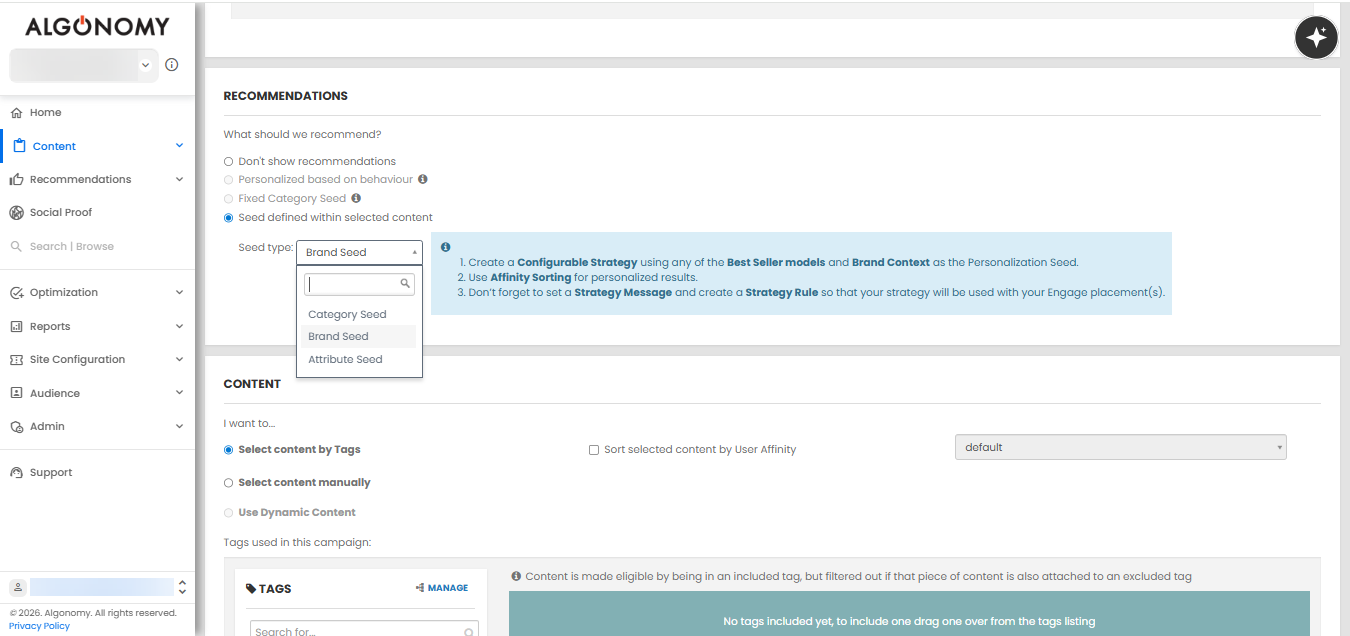
Marketers can now dynamically align product recommendations with promotional offers by defining recommendation seeds directly within the selected content. Recommendations can be driven by category, brand, or attribute, ensuring that the products shown closely reflect the offer context while remaining personalized. This applies even when content is selected using tags, removing previous limitations.
The interface provides clear controls to choose the seed type, along with inline guidance to complete the required setup. Campaigns can explicitly define how recommendations are generated, while existing strategy configurations continue to determine the final output. Rule summaries and list views clearly indicate when offer-based recommendations are in use, making campaigns easier to manage. Together, these enhancements simplify campaign creation, reduce manual configuration, and help deliver more relevant and scalable offer-driven experiences.
Recommend
Validation Enhancements for Click URL Parameters
Input handling for click URL parameters has been strengthened to prevent unintended script execution. The platform now validates all values passed through click-related parameters, ensuring that only safe and expected inputs are processed during request handling.
This improvement closes a potential vulnerability path and adds an extra layer of protection alongside existing client-side safeguards. By enforcing stricter validation at the backend, the platform ensures more reliable and secure handling of click interactions without impacting normal tracking or reporting behavior.
Jira: ENG-31698
Improved Visibility into Rule-Based Product Filtering
The cfrad response has been enhanced to provide clearer insight into how products are filtered when rules use AND or OR logic. When products are excluded during rule evaluation, the response now includes details showing which products were filtered out as part of this logic.
This improvement makes it easier for teams to understand and validate rule behavior during analysis and troubleshooting. By clearly surfacing filtered products, users can more confidently assess rule effectiveness, identify unexpected exclusions, and fine-tune rule logic to achieve the desired merchandising outcomes.
Jira: ENG-31617
Ensemble AI
Product Count Visibility for Free Form Style Definitions
Free Form style definitions in Ensemble AI now clearly display the total number of products included based on the selected categories and applied filters. This brings Free Form behavior in line with structured styles, where product counts are already visible.
By showing the total number of seed products upfront, this update removes ambiguity between products being added and the final set of products used. It helps users better understand the scope of a style definition and make more confident decisions when configuring and reviewing curated collections.
Jira: ENG-31692
Option to Include Product Image Vectors in LLM Configuration
The LLM Configuration page now includes an option to enable product image vectors when the vector database is turned on. This gives teams control over whether visual information from product images is used alongside existing data when powering Ensembles and Catalog Enrichment.
By incorporating image-based signals, users can enhance how products are grouped and enriched, helping ensembles better reflect visual style and brand identity. This added flexibility supports more refined curation and improves the overall relevance of product experiences presented to shoppers.
Jira: ENG-31522
Other Feature Enhancements
The following feature enhancements and upgrades have been made in the release version 26.03.
|
Jira # |
Module/Title |
Summary |
General Availability |
|---|---|---|---|
|
Discover: Browse Boost and Bury Merchandising in new Discover
|
The dashboard now includes a dedicated Browse Boost and Bury view that allows merchandisers to control how categories are promoted or deprioritized in new Discover. Users can create rules with clear naming, date ranges, and environment controls, making it easier to manage merchandising intent over time. Rules can be defined using category context and applied through product, brand, attribute, or price criteria, with support for both positive and negative boosts. All rules are listed in a single view with edit and delete options, simplifying ongoing management and improving consistency across browse experiences. |
05-Feb-26 |
|
|
Recommend: Product Comparison Navigation Update |
Product Comparison has been moved to the Recommendations section in the navigation to better align with how it is used. The page and navigation label have also been simplified to Product Comparison, removing the Configuration wording. This update improves navigation clarity and makes it easier for users to find and access product comparison capabilities in a more intuitive location. |
05-Feb-26 |
|
|
Recommend: Improved Product Details Resolution in Advanced Merchandising |
Product information now loads correctly when creating rule contexts using a specific product ID in Advanced Merchandising. Product names are displayed as expected, and existing products are no longer shown as new when they already exist in the catalog. This improves accuracy and clarity when defining product-based contexts and reduces confusion during rule setup. |
05-Feb-26 |
|
|
Platform: Enhanced Request Logging for Configured Sites
|
Enhanced Request Logging for Configured Sites Request logging has been enhanced to capture request headers for all REST API calls and request bodies for POST calls, limited to configured sites only. This information is now available in Kibana to support deeper visibility during analysis and troubleshooting. There is no impact on non-configured sites, where logging behavior remains unchanged. All existing functionality continues to operate as before, ensuring stability while improving observability where enabled. |
05-Feb-26 |
|
|
Ensemble AI: Gender-Based Filtering for Visual AI Ensembles |
Ensemble results powered by visual AI now respect gender-based filtering when image vectors are used from the vector database. Products returned from visual similarity matching are filtered to align with the gender setting of the seed product. This enhancement improves relevance and consistency in visually driven ensembles, helping ensure that curated collections better match shopper expectations and brand presentation. |
05-Feb-26 |
|
|
Enterprise Dashboard: Cleaner Table Selection for DSW Strategy Creation
|
When creating a DSW strategy, the table selection dropdown now shows only relevant work tables, removing internal tables that are not intended for direct use. This simplifies the selection process and reduces the risk of choosing an incorrect table. Table names have also been simplified by removing internal prefixes, making them easier to read when creating and reviewing strategies. |
05-Feb-26 |
|
|
Enterprise Dashboard: Clearer Campaign Visibility for Multi-Content Test Drives |
The Campaigns view in Content Test Drive for multi-content placements now shows only the campaign with the highest priority for each content. This removes misleading entries where multiple campaigns appeared to be active, even though only one can apply at a time. To improve clarity, the table now includes additional columns for Content Name and Priority. This makes it easier to understand which campaign is applied to each content and why it was selected. |
05-Feb-26 |
|
|
Social Proof: Improved Reporting Accuracy for Social Proof Optimization
|
The fallback behavior has been removed for Social Proof scenarios where optimization is enabled. When optimized messages are requested and no message is returned, the platform no longer falls back to the standard message flow. This change prevents duplicate experience tracking and ensures reporting reflects actual message delivery more accurately. This applies to client-side integrations using Social Proof optimization and helps teams rely on cleaner, more accurate optimization insights. |
05-Feb-26 |
Bug and Support Fixes
The following issues have been fixed in the release version 26.03.
|
Jira # |
Module/Title |
Summary |
General Availability |
|---|---|---|---|
|
Discover: Personalization Skipped When No User Activity Is Present |
We have fixed an issue where personalization was applied in New Browse even when a user had no view, click, or purchase history, leading to unnecessary processing. Personalization is now correctly skipped in such cases, improving performance and ensuring category results are ordered as expected. |
05-Feb-26 |
|
|
Chatbot: Client-Specific Instrumentation for Chatbot Server |
We have fixed an issue where the chatbot server was not consistently using client-specific instrumentation. The chatbot now correctly applies client-level instrumentation settings. In addition, the rrserver environment can now be set through the r3_env query parameter on the base URL, aligning chatbot behavior with existing Dynamic Experience instrumentation. |
05-Feb-26 |
|
|
Find: Resolved Null Pointer Issue in Global Ranking Job
|
We have fixed an issue that caused the global ranking job to fail due to an unexpected null condition during execution. This error was encountered in production and prevented the ranking process from completing successfully. The fix ensures the job now runs reliably without interruptions, improving stability and consistency of global ranking updates. |
05-Feb-26 |
|
|
Data Engineering: Social Proof Tracking When No Messages Meet Thresholds |
We have fixed an issue where Social Proof interactions were not being tracked when no messages met the defined threshold criteria for a product. In such cases, the experience was triggered but no corresponding tracking entry was recorded. Tracking now occurs even when no Social Proof message is shown, with the event correctly logged to indicate the outcome. This ensures more accurate reporting and a complete view of Social Proof behavior across all experiences. |
05-Feb-26 |
|
|
Recommend: Primary Category Filtering for Category Recommendations |
We have fixed an issue where category recommendations were returning categories not marked as primary, even when strategies were configured to use Primary Categories. The system now correctly respects Primary Category configuration, ensuring category recommendations align with merchandising intent. |
05-Feb-26 |
|
|
Social Proof: Corrected Attribution for Social Proof Reporting |
We have fixed an issue where Social Proof reporting attributed performance only to the last experience or variation shown, leading to underreporting for other variations. Attribution now correctly reflects all relevant experiences and variations shown, including appropriate handling of shown and not shown scenarios. This ensures more accurate and complete Social Proof performance reporting. |
05-Feb-26 |